

Virtual Number for WhatsApp Verification
About WhatsApp
WhatsApp verification requires a phone number, but many users prefer not to expose their personal phone number for privacy reasons. A virtual phone number for WhatsApp provides a secure alternative, letting you verify your account without compromising your real contact information.
What Is a Virtual Phone Number, and How Does It Work with WhatsApp?
A virtual phone number is not tied to a physical SIM card or mobile device. It works through an internet connection on smartphones and computers to receive SMS messages and calls, making it perfect for online verifications.
To create a WhatsApp business account or personal profile, you need to verify with a code received via SMS. With a temp number for WhatsApp verification, you can complete this process without exposing your personal mobile number, protecting your privacy while accessing WhatsApp features.
How to Buy a Virtual Number for WhatsApp
Getting a virtual phone number for WhatsApp verification via HeroSMS involves just a few simple steps:
- Select your desired country from the menu available at the top of the page. Specify additional options such as "Verification by number” if needed.
- Your selected country's available virtual phone number will pop up under “My purchases” heading. This temporary phone number can be used as a fake WhatsApp number to verify your account privately. Copy this number and enter it into the verification prompt when setting up your WhatsApp account.

- As soon as you attempt verification with the virtual number, HeroSMS will automatically place a call to it. The last few digits of the number will then display on your Activation card on the website. Input these digits into the verification box to fully confirm your virtual number with WhatsApp.
Note: Virtual numbers provided for verification remain active for 5 minutes. To avoid failed verification, if you do not receive the automated call within the first few minutes, quickly cancel the number by clicking the red X icon. This gives you a few more minutes to verify with a new virtual number.
Ready to get started?
Creating a WhatsApp Account with a Virtual Number
Once you have purchased a virtual phone number, using it to create a WhatsApp account only takes a few quick steps:
- Download and launch the WhatsApp app on your device.
- When prompted, enter your newly acquired virtual number instead of your mobile number.
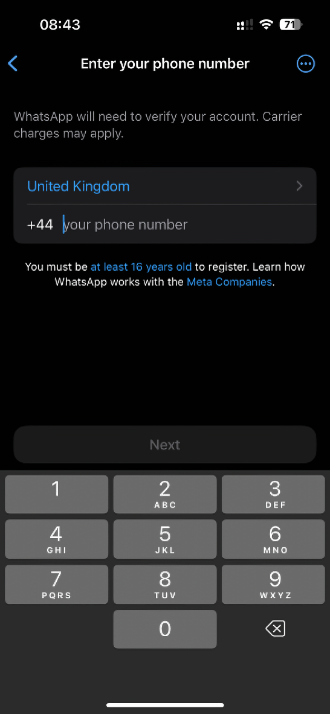
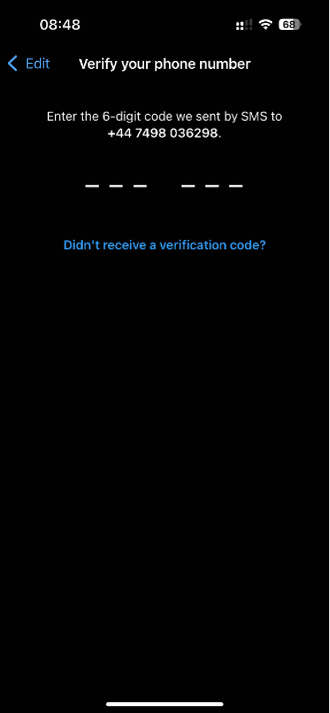
- WhatsApp will automatically send a 6-digit one-time password (OTP) to that virtual number via SMS.
- Input the SMS verification code in the WhatsApp app to confirm your number.
- Fill in your profile details such as photo, name, and the About section to complete account creation.
That's it! Your WhatsApp account is now registered with a virtual number, keeping your personal mobile number private and separate from your WhatsApp contacts.
Get Virtual Phone Number for WhatsApp from HeroSMS
⚡ Instant SMS Delivery
Receive verification codes within seconds. Complete your registration immediately without delays.
🌍 Global Number Coverage
Access virtual phone numbers from 180+ countries worldwide. Choose any geographic location that fits your needs.
🔒 Complete Privacy Protection
Keep your real phone number private. Virtual numbers create a secure barrier between your personal contact information and online services.
💰 Competitive Pricing & Discounts
Affordable pricing for all users. Regular customers get access to wholesale prices and loyalty discounts up to 40%.
🔄 Automatic Refund System
No SMS received within 20 minutes? Get an instant automatic refund to your balance.
🕒 24/7 Customer Support
Round-the-clock customer support to assist with any queries or issues.
Other Popular Services
 getir
getir trendyol
 Telegram
 Google,youtube,Gmail
 PayPal
 facebook
 Amazon
 TikTok/Douyin
 WeChat
 Discord
 Grindr
 Netflix
 Instagram+Threads
 Viber
Viber Twitter
 vk.com
 OpenAI
 Yahoo
Yahoo LinkedIN
 Microsoft
 Venmo
Venmo Snapchat
 Signal
 Nike
Nike eBay
eBay
More services can be found in the left menu of the site.
FAQ
Temporary numbers are designed for one-time verification. If you need to receive additional messages or codes, you can purchase a new virtual number for WhatsApp.
You can also complete the registration in the desktop version of the messenger.
The code will appear on the "Activations" page to the right of the number as soon as you receive it.
These steps will help you: Use Proxy/VPN; Change your number, choose another mobile operator; Try registering through the incognito mode or using another device; Contact tech support. If the code is not received within 20 minutes, your money will be returned to the balance automatically.