
Virtual Phone Number for PayPal Verification
About PayPal
Virtual phone numbers have become an essential solution for secure PayPal verification and online payment account management. These disposable phone numbers help users receive PayPal SMS codes, complete PayPal account registration, and protect personal data from identity theft and unwanted exposure. Virtual phone number services provide a safe alternative to using your real mobile number for SMS verification during financial transactions and account confirmation.
By using temporary phone numbers to receive SMS online, users can verify PayPal accounts, manage multiple PayPal profiles, and complete security checks without sharing personal contact information. Virtual numbers simplify receiving one-time passwords, password recovery codes, and verification messages while enhancing privacy, anonymity, and data protection throughout the PayPal verification process.
Why Use a Virtual Number for PayPal?
PayPal requires phone verification for all new accounts to prevent fraud and ensure security. Instead of sharing your personal number, virtual numbers offer a safer alternative:
- Keep your real phone number private from PayPal and third parties
- Protect against identity theft and unwanted contact
- Verify your account without a physical SIM card
- Receive SMS codes instantly through internet connection
- Dispose of the number after verification for added security
Virtual numbers work just like regular phone numbers for verification purposes, providing the same level of security PayPal requires while maintaining your privacy.
How to Get a Virtual Number for PayPal
Getting a virtual phone number to verify your PayPal account is quick and straightforward with HeroSMS. Just follow these steps:
- Top Up Balance: Ensure sufficient balance on your HeroSMS account before purchasing. For added security, consider enabling a VPN.
- Select Country: Choose your desired country at the top of the page and click the shopping cart icon.
- Configure Settings: Specify your requirements - rental period, and quantity of numbers.
- Copy Your Number: Your purchased number will appear in "My Purchases". Copy this number for PayPal registration.

- Register on PayPal: Enter your virtual number in the phone number field when PayPal requests verification.
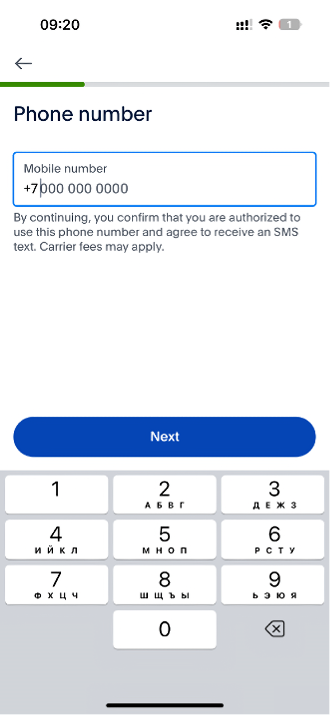
- Receive Code: Within 20 minutes, the SMS verification code from PayPal will appear in your HeroSMS dashboard next to your virtual number.
- Complete Verification: Input the verification code into PayPal to finalize your account setup.
Important: If you don't receive the SMS verification code within 20 minutes, your balance will be automatically refunded. No physical SIM card required.
Ready to get started?
How to Use a Virtual Phone Number for PayPal Verification
To privately and securely register for a PayPal account using a temporary virtual phone number, follow this straightforward process:
- Enable VPN: Activate a VPN on your device and select a server location matching your purchased virtual number's country. This ensures PayPal verifies the appropriate IP address when you provide your virtual phone number.
- Start PayPal Registration: With your VPN active, visit the PayPal website and open a new account by entering your name, email, password, and personal details. When you reach the phone number field, input your virtual mobile number from HeroSMS instead of your personal phone.
- Accept Terms: Read and agree to PayPal's User Agreement and Privacy Policy before clicking Sign Up to continue your e-commerce payment system registration.
- Receive Verification Code: PayPal will automatically send a 6-digit verification code to your virtual number, visible in your HeroSMS account dashboard. No physical SIM card required for this SMS service.
- Complete Verification: Within minutes, you'll receive the SMS verification code from HeroSMS. Enter it into PayPal to complete the phone verification process.
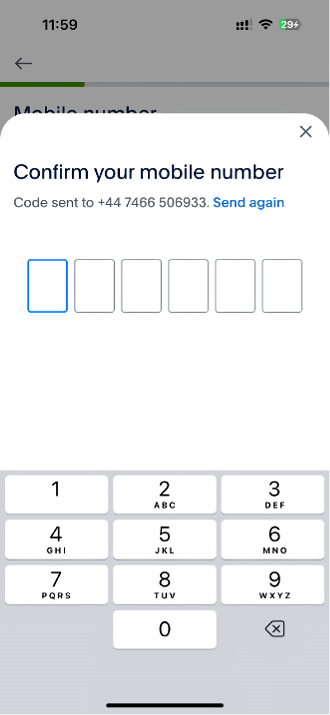
By using a temporary virtual phone number and VPN together, PayPal users can safely register without providing their personal phone number during signup, protecting sensitive data while maintaining PayPal's secure verification process.
Benefits of Using a Virtual Phone Number for PayPal Verification
Using a temporary virtual phone number to verify your PayPal account offers significant advantages:
- Enhanced Privacy: Protects your personal phone number from unwanted spam and third-party access. Your real contact information stays private.
- Increased Security: Disposable numbers are untraceable back to you, reducing risks of identity theft and fraud. No physical SIM card required.
- Global Accessibility: Access SMS messages from anywhere in the world through your online dashboard, not just from your device.
- Cost-Effective: Budget-friendly alternative to buying new SIM cards when traveling or needing temporary verification services.
- Quick & Convenient: Get a virtual number in minutes without changing phone plans or carriers. Perfect for fast PayPal verification.
Virtual numbers provide complete anonymity while maintaining the security standards PayPal requires, letting you create verified accounts without compromising your personal data.
Get Your Virtual Phone Number for PayPal from HeroSMS
⚡ Instant SMS Delivery
Receive verification codes within seconds. Complete your registration immediately without delays.
🌍 Global Number Coverage
Access virtual phone numbers from 180+ countries worldwide. Choose any geographic location that fits your needs.
🔒 Complete Privacy Protection
Keep your real phone number private. Virtual numbers create a secure barrier between your personal contact information and online services.
💰 Competitive Pricing & Discounts
Affordable pricing for all users. Regular customers get access to wholesale prices and loyalty discounts up to 40%.
🔄 Automatic Refund System
No SMS received within 20 minutes? Get an instant automatic refund to your balance.
🕒 24/7 Customer Support
Round-the-clock customer support to assist with any queries or issues.
Other Popular Services
 getir
getir trendyol
 Telegram
 Whatsapp
 Google,youtube,Gmail
 facebook
 Amazon
 TikTok/Douyin
 WeChat
 Discord
 Grindr
 Netflix
 Instagram+Threads
 Viber
Viber Twitter
 vk.com
 OpenAI
 Yahoo
Yahoo LinkedIN
 Microsoft
 Venmo
Venmo Snapchat
 Signal
 Nike
Nike eBay
eBay
More services can be found in the left menu of the site.
FAQ
To verify a PayPal account with a virtual number, purchase one from HeroSMS, enable a matching VPN, input the number when PayPal requests it, then check your HeroSMS dashboard for the 6-digit code alongside the virtual number. Enter this PayPal verification code to confirm your number.
Yes, PayPal allows virtual phone numbers for verification. Get one from HeroSMS, give it to PayPal instead of your personal number, then use the verification code you receive to confirm signup. That will help keep your identity private.
The PayPal verification code is sent automatically via SMS when you begin account creation using a phone for identity confirmation. If you use a virtual number from HeroSMS, you can view this 6-digit code alongside the number in your account.
PayPal uses phone number verification to confirm user identities and combat fraud by sending a confirmation code. This applies for all accounts in order to uphold security. Virtual numbers work the same as standard numbers to fulfill this requirement.
You can normally expect to receive your 6-digit PayPal phone verification code anywhere from 20 seconds to 10 minutes. Virtual numbers from HeroSMS guarantee code delivery to your purchased number within 20 minutes.