

Virtual Number for Facebook Verification
About Facebook
Virtual phone numbers have emerged as a key tool for online identity protection and multi-account management. These disposable phone numbers are essential for Facebook SMS codes, Facebook account creation, and protecting users from identity theft. Virtual phone number providers offer secure alternatives to personal mobile numbers for receiving SMS verification codes without sharing sensitive information.
By providing fake phone numbers to receive SMS online, virtual numbers enable seamless Facebook signup and creating multiple Facebook accounts without revealing your real phone number. Users can manage password reset codes, email verification, and phone calls forwarding while maintaining anonymity and data protection during the verification process across social platforms.
Features of a Temp Number for Facebook Registration
Using a temporary fake number for Facebook registration provides convenience, privacy, and security for multi-account management:
- Convenient Verification: Simplifies Facebook account creation without using your personal phone number, protecting against identity theft.
- Enhanced Privacy: Virtual numbers keep your real phone number anonymous, ensuring confidentiality of personal information.
- Secure Account Setup: Temporary numbers are isolated from your real identity, reducing personal data compromise risk.
- SMS Reception: Virtual numbers receive SMS messages and verification codes for account validation across social platforms.
- Flexible Management: Control SMS notifications with seamless verification code forwarding to your email inbox.
- Broad Accessibility: Facebook verification phone numbers available to anyone with internet connection for multi-account verification.
Virtual numbers transform the social media verification process, enabling easy management of multiple accounts while maintaining data confidentiality.
How Can You Get a Temporary Phone Number to Verify Facebook?
Acquiring a temporary phone number for Facebook verification involves simple steps that protect against identity theft:
- Top Up Balance: Ensure sufficient balance on the service provider's website before purchasing.
- Country and Number Selection: Specify the country for your virtual number at the top of the page.
- Purchase the Number: Click the cart icon to buy the selected temporary phone number.
- Use for Registration: The purchased number appears in your "My purchases" list. Use this for Facebook's registration field instead of your personal phone number.

- Receive Confirmation Code: The Facebook SMS code (also known as confirmation code) sent by Facebook will appear next to your virtual number on the website. You can also forward these codes to your email for easy access.
By using temporary phone numbers specifically for Facebook phone verification, you securely create and manage multiple Facebook accounts while maintaining privacy and protecting against identity theft through SMS verification codes.
Ready to get started?
Creating an Account With a Temporary Number for Facebook
Creating a Facebook account using a temporary phone number ensures privacy and protects against identity theft. HeroSMS makes it easy to obtain temporary numbers for Facebook phone verification. Here's the complete guide:
Account Setup Process:
- Prepare Tools: Download the Facebook app or access their website. Have your virtual phone number ready.
- Begin Registration: Open Facebook and choose "create new account." Input basic information such as name and email when prompted.
- Enter Temporary Phone Number: When Facebook requests phone verification, enter your temporary number instead of your personal phone number. This crucial step protects your real contact information.
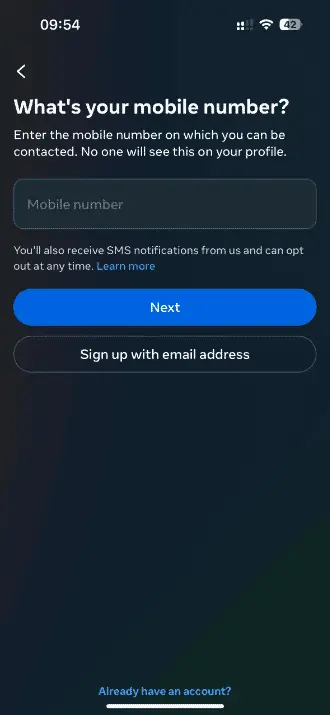
- Receive Verification Code: Facebook sends a verification code via SMS to your temporary number.
- Retrieve and Enter Code: Access the code from your temporary number service and enter it on Facebook to complete verification. You can also forward these codes to your email for convenience.
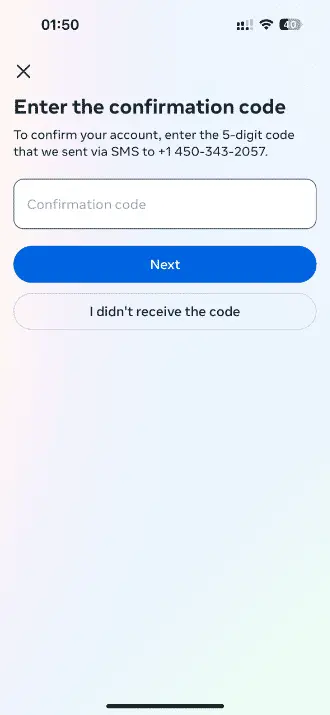
- Complete Profile: Fill in profile details like name, photo, and bio after successful verification.
- Finalize Registration: Review details, agree to Facebook's terms, and complete the registration process.
Post-Registration Security:
- Adjust Privacy Settings: Configure your account's privacy settings to control who can see posts, send friend requests, and find your profile.
- Explore Features: Join groups, connect with friends, and engage with Facebook's various platform activities.
Using a fake number for Facebook enhances privacy and gives you control over your online presence. This method is ideal for keeping personal phone numbers private or managing multiple accounts while preventing identity theft through secure SMS verification.
Verify Facebook with a Virtual Number
⚡ Instant SMS Delivery
Receive verification codes within seconds. Complete your registration immediately without delays.
🌍 Global Number Coverage
Access virtual phone numbers from 180+ countries worldwide. Choose any geographic location that fits your needs.
🔒 Complete Privacy Protection
Keep your real phone number private. Virtual numbers create a secure barrier between your personal contact information and online services.
💰 Competitive Pricing & Discounts
Affordable pricing for all users. Regular customers get access to wholesale prices and loyalty discounts up to 40%.
🔄 Automatic Refund System
No SMS received within 20 minutes? Get an instant automatic refund to your balance.
🕒 24/7 Customer Support
Round-the-clock customer support to assist with any queries or issues.
Other Popular Services
 getir
getir trendyol
 Telegram
 Whatsapp
 Google,youtube,Gmail
 PayPal
 Amazon
 TikTok/Douyin
 WeChat
 Discord
 Grindr
 Netflix
 Instagram+Threads
 Viber
Viber Twitter
 vk.com
 OpenAI
 Yahoo
Yahoo LinkedIN
 Microsoft
 Venmo
Venmo Snapchat
 Signal
 Nike
Nike eBay
eBay
More services can be found in the left menu of the site.
FAQ
Select a virtual number on our site, enter your email, and receive the number details. Use this number when Facebook prompts you for a phone number during signup.
Facebook requires a phone number for verification to increase security. A virtual number lets you keep your personal number private.
No, Facebook requires all users to provide a phone number during the account creation process for verification.
No, Facebook only allows one account per phone number as part of their security policy. Each account must have a unique number.
Services like ours provide virtual phone numbers that work for receiving Facebook verification codes while keeping your personal number private.