


Virtual Number for Amazon Verification
About Amazon
Virtual phone numbers have become an essential solution for secure Amazon verification and online account management. These disposable phone numbers help users receive Amazon SMS codes, complete Amazon account registration, and protect personal data from identity theft and unwanted exposure. Virtual phone number services provide a safe alternative to using your real mobile number for SMS verification during purchases, account confirmation, and marketplace activities.
By using temporary phone numbers to receive SMS online, users can verify Amazon accounts, manage multiple Amazon profiles, and complete security checks without sharing personal contact information. Virtual numbers simplify receiving one-time passwords, password recovery codes, and verification messages while enhancing privacy, anonymity, and data protection throughout the Amazon verification process.
Why Use a Virtual Number for Amazon?
Amazon and other online marketplace platforms require phone verification for account security. Instead of sharing your personal number, virtual numbers protect your privacy and anonymity.
Our service provides internet-based numbers that receive SMS verification codes instantly. Use them for:
- Amazon ecosystem: Main accounts, Amazon Prime, Amazon Web Services
- Payment & messaging: PayPal linking, WhatsApp verification, email confirmation
- Retail platforms: Any online marketplace requiring phone verification
Your real number stays private. Create accounts securely without exposing personal contact information to e-commerce platforms.
How to Buy a Temporary Number For Amazon Verification
Navigating Amazon registration with a temporary phone number for Amazon is straightforward. Here's a step-by-step guide to purchasing a virtual number for Amazon, ensuring secure setup for online marketplace shopping.
- Understanding SMS Activation: SMS activation confirms your number during registration. Amazon sends a confirmation code via SMS to your provided number. To keep your personal number private, use a virtual phone number - the one-time password is sent directly to your HeroSMS account.
- Top Up Your Balance: Ensure your balance is topped up before purchasing your temporary phone number for Amazon. For enhanced security, consider using a VPN or proxy.
- Specify Requirements: Use the functionality at the top of the page to customize your selection, including how many numbers you need for Amazon, Amazon Prime, or Amazon Web Services accounts.
- Complete Purchase: After selection, click the cart icon to buy your temporary phone number.
- Activate Your Number: Your purchased number appears in "My purchases" list. Copy this number for the Amazon registration field.

- Receive SMS Online: Monitor the activation card where Amazon's confirmation code will appear. Enter this one-time password to complete registration. This process also works for PayPal, WhatsApp, and email verification.
If the confirmation code doesn't arrive within 20 minutes, funds are automatically refunded. This SMS activation process ensures privacy and security for your Amazon account creation, letting you focus on exploring the online marketplace offerings with enhanced protection.
Steps of Creating an Amazon Account With a Fake Phone Number
Setting up an Amazon account with a fake phone number is essential for privacy and security on online marketplaces. Here's a detailed walkthrough for registering an Amazon account using a virtual number, keeping your personal information private while streamlining account creation.
- Acquire a Virtual Phone Number: Purchase a virtual phone number from a reliable provider like HeroSMS. This number receives Amazon verification codes, keeping your real number private for Amazon, Amazon Prime, Amazon Web Services, PayPal, and WhatsApp registrations.
- Visit Amazon's Sign-Up Page: Navigate to Amazon's website and access the sign-up page - your entry point to the online marketplace.
- Start Registration Process: Create a new account by entering details like name, email, and phone number.
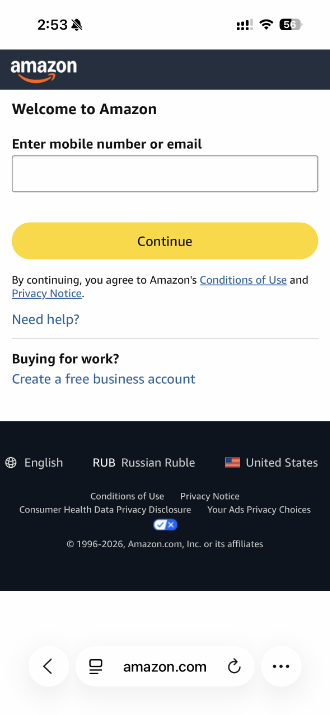
- Enter Your Virtual Phone Number: Input the fake phone number you purchased. This crucial step links your account to a secure number protecting your identity.
- Await the Verification Code: Amazon sends a verification code via SMS to your virtual number. Check your virtual number platform to retrieve this code.
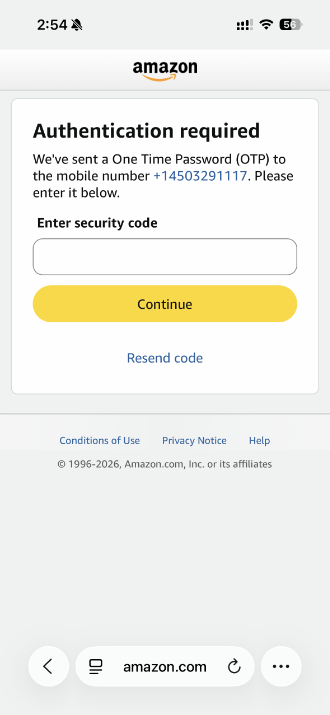
- Enter Verification Code: Promptly enter the verification code into Amazon's designated field, confirming your virtual phone number is valid and linked.
- Complete Additional Details: Add required information including password (Amazon OTP) and billing address.
- Review and Submit: Review all information for accuracy before submitting to complete the registration process.
- Confirmation and Account Activation: Amazon sends a confirmation email. Follow instructions to fully your new Amazon account.
- Start Exploring: Your Amazon account is ready! This method works for Amazon Prime, Amazon Web Services, and other online marketplace services, ensuring one-time password security across platforms.
Ready to get started?
Prime Shopping with Amazon's Top-Rated App
For savvy online marketplace shoppers, the Amazon shopping app brings vast selection and convenience of the world's largest retailer to your smartphone. This top-rated app empowers consumers to browse, buy, and manage orders from Amazon's endless inventory on the digital online marketplace. Amazon Prime members access free shipping and streaming benefits directly through the app.
The app requires secure setup using SMS verification and one-time password authentication for enhanced security. Users can link PayPal accounts, manage email notifications, and integrate WhatsApp for order updates. Amazon Web Services powers the app's infrastructure, ensuring seamless performance with SMS notifications, email confirmations, and one-time password security for transactions.
Whether seeking household staples or unique discoveries, the Amazon shopping app provides access to the vast online marketplace selection with price comparisons, real-time tracking, and simplified returns. For those valuing convenience and security, the Amazon app delivers premier digital retail with Amazon Prime, PayPal integration, and Amazon Web Services reliability right in your pocket.
Get Your Virtual Phone Number for Amazon from HeroSMS
⚡ Instant SMS Delivery
Receive verification codes within seconds. Complete your registration immediately without delays.
🌍 Global Number Coverage
Access virtual phone numbers from 180+ countries worldwide. Choose any geographic location that fits your needs.
🔒 Complete Privacy Protection
Keep your real phone number private. Virtual numbers create a secure barrier between your personal contact information and online services.
💰 Competitive Pricing & Discounts
Affordable pricing for all users. Regular customers get access to wholesale prices and loyalty discounts up to 40%.
🔄 Automatic Refund System
No SMS received within 20 minutes? Get an instant automatic refund to your balance.
🕒 24/7 Customer Support
Round-the-clock customer support to assist with any queries or issues.
Other Popular Services
 dolap
dolap trendyol
 getir
getir bip
bip hepsiburada
 sahibinden
 Telegram
 Whatsapp
 Google,youtube,Gmail
 PayPal
 facebook
 TikTok/Douyin
 WeChat
 Discord
 Grindr
 Netflix
 Instagram+Threads
 Viber
Viber Twitter
 vk.com
 OpenAI
 Yahoo
Yahoo LinkedIN
 Microsoft
 Venmo
Venmo Snapchat
 Signal
 Nike
Nike eBay
eBay
More services can be found in the left menu of the site.
FAQ
Amazon requires a phone number during account creation for identity verification and security purposes.
Yes, you can use a temporary virtual phone number for receiving the SMS verification code needed to register an Amazon account.
Services like HeroSMS provide an instant virtual number for Amazon that works seamlessly for getting the SMS code when making a new Amazon account.
Purchase a virtual number on our site, use it when prompted for your phone number during Amazon registration, then enter the confirmation code you receive.
No, Amazon only allows one account per phone number. To register multiple accounts, you'll need a unique virtual number for each one.