


Temporary Phone Numbers for Discord Verification
About Discord
Virtual phone numbers are on the rise for those seeking extra privacy online. Unlike traditional mobile numbers tied to a specific location, virtual numbers require only an internet connection on your smartphone or computer. This makes them perfect for registering new accounts without revealing your real number.
One popular use case is getting a virtual number for verifying a new Discord profile. Discord has become the go-to platform for online chat communities focused on gaming, entertainment and more. When signing up for a new Discord account, you need a phone number capable of receiving SMS messages for verification. Virtual phone numbers function just like real mobile numbers for receiving verification codes, but keep your personal phone number private.
The same approach works for other popular platforms: Instagram, WhatsApp, Viber, Telegram, Facebook Messenger, LinkedIn, and email services like Gmail. A temporary phone number for Discord — or any of these services — provides the ideal solution for registering while maintaining privacy.
What Does Discord Use Phone Verification For?
When creating a new Discord account, users must verify their phone number via an SMS code. Discord requires phone number verification for several key reasons:
- Safety and abuse prevention. Phone verification makes it harder for banned users to evade bans through new accounts, reducing harassment, threats, and spam.
- Security. It provides another layer of identity confirmation, deterring scammers and bad actors who try to create fake accounts for spreading malware or stealing data.
- Authenticity. It distinguishes real human users from internet bots and inauthentic accounts used for scraping information or manipulating online chat conversations.
Mandatory phone verification fosters a more trusted, human-centric community. Using a temp phone number for Discord helps mitigate privacy risks when creating a legitimate account.
How to Get a Temporary Phone Number for Discord
Securing a temporary phone number for Discord is a straightforward process. Here's a step-by-step guide.
Preparation for SMS Activation
SMS activation is the simplest way to confirm your number during registration. Discord sends a confirmation code via SMS to the number you provide. To keep your personal number private, opt for a virtual phone number on HeroSMS — the code is sent directly to your account.
Top Up Your Balance
Top up your balance on HeroSMS before you start. This is required to purchase your Discord phone number for online SMS. For a smoother experience, consider using a VPN or proxy.
Specify Your Requirements
At the top of the page, select the country and configure advanced settings if needed: verification by number or SMS, and quantity of phone numbers. This ensures you get a number that meets your specific needs.
Complete the Purchase
Click the cart icon to buy your temporary phone number. The purchased number will appear in your "My purchases" list. Copy it and paste it into the Discord registration field.

Receive the SMS and Enter the Confirmation Code
Watch the activation card next to your number — the confirmation code from Discord will appear there. Enter this code in Discord to complete your registration.
If the confirmation code doesn't arrive within 20 minutes, the funds are automatically refunded to your balance.
Ready to get started?
How to Create a Discord Account With a Temporary Number
- Get Discord ready. Download the Discord app or open their website.
- Hit "Register". Click the Register button on the Discord login page.
- Enter your number. When Discord asks for a phone number, enter your virtual number from HeroSMS
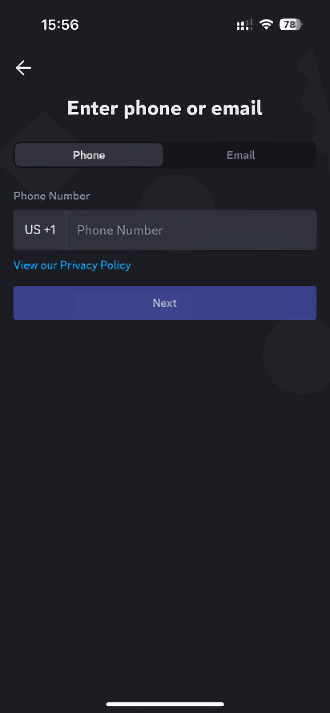
- Wait for the verification code. Discord will send a verification code to your virtual number.
- Enter the code on Discord. Type the received code into the Discord verification field.
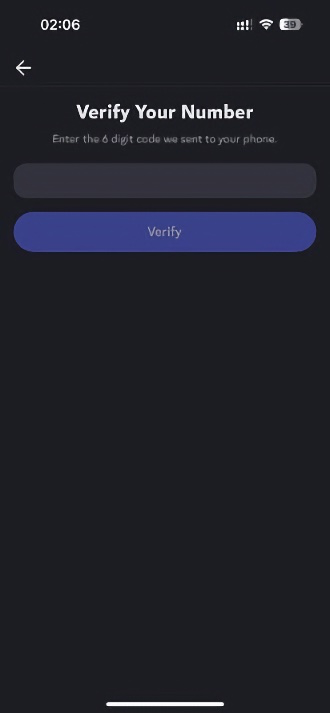
- Finish setup. Choose a username, add an avatar, and set your preferences.
Why Use a Virtual Number for Discord verification?
⚡ Instant SMS Delivery
Receive verification codes within seconds. Complete your registration immediately without delays.
🌍 Global Number Coverage
Access virtual phone numbers from 180+ countries worldwide. Choose any geographic location that fits your needs.
🔒 Complete Privacy Protection
Keep your real phone number private. Virtual numbers create a secure barrier between your personal contact information and online services.
💰 Competitive Pricing & Discounts
Affordable pricing for all users. Regular customers get access to wholesale prices and loyalty discounts up to 40%.
🔄 Automatic Refund System
No SMS received within 20 minutes? Get an instant automatic refund to your balance.
🕒 24/7 Customer Support
Round-the-clock customer support to assist with any queries or issues.
Other Popular Services
 dolap
dolap trendyol
 getir
getir bip
bip hepsiburada
 sahibinden
 Telegram
 Whatsapp
 Google,youtube,Gmail
 PayPal
 facebook
 Amazon
 TikTok/Douyin
 WeChat
 Grindr
 Netflix
 Instagram+Threads
 Viber
Viber Twitter
 vk.com
 OpenAI
 Yahoo
Yahoo LinkedIN
 Microsoft
 Venmo
Venmo Snapchat
 Signal
 Nike
Nike eBay
eBay
More services can be found in the left menu of the site.
FAQ
Yes. A virtual phone number works just like a real mobile number for receiving SMS verification codes. Discord cannot distinguish between a virtual and a physical number, so the verification process is identical.
Yes. The same virtual number can be used to verify accounts on Instagram, WhatsApp, Viber, Telegram, Facebook Messenger, LinkedIn, Gmail, and other services that require SMS confirmation during registration.
If the confirmation code doesn't arrive within 20 minutes, the funds are automatically refunded to your HeroSMS balance. You can then try again with a different number.
Yes. Using a virtual number protects your real phone number from exposure, spam calls, and internet bots. Your personal information stays private, while you still complete Discord's standard verification process.