


Temporary Number for Twitter (X) Verification
About Twitter (X)
A virtual phone number is a location-independent number accessible on any connected mobile device for receiving SMS online. Unlike a traditional SIM card, it works entirely over the internet and requires no physical hardware.
As a verification tool, a virtual number protects your personal data when creating social media accounts. It acts as a disposable phone number to shield your real personal number and identity during Twitter verification — similar to a prepaid mobile phone used for anonymity.
Virtual numbers enable seamless Twitter account creation without compromising privacy. By receiving an SMS one-time password (OTP) for multi-factor authentication, they facilitate Twitter verification while keeping your personal number private. You can also manage multiple Twitter accounts while keeping all personal data confidential.
Why Does Twitter (X) Require a Phone Number?
Twitter requires a phone number for several reasons tied to security and authentication.
Spam and fraud prevention. Linking a virtual phone number to your account protects against the creation of fraudulent or spam accounts — a persistent problem across social platforms.
Account recovery. A linked temporary phone number becomes a recovery tool when you're locked out of your account or have forgotten your password. This is especially important given the sensitive personal information stored in a Twitter feed.
Two-factor authentication. A phone number is central to multi-factor authentication on Twitter: a one-time password is sent via SMS to your mobile device, adding a critical layer of security beyond just a password. Similar authentication flows are used by Google, Google Authenticator, and PayPal — Twitter's approach aligns with industry standards.
Contact sync. Twitter can match your phone number against contacts, making it easier to find and connect with people you know.
In short, using a temporary phone number for Twitter — rather than your real one — lets you benefit from all these security features while keeping your personal data and email address off the platform.
How to Get a Temporary Phone Number for Twitter (X) Verification
- Top Up Your Balance — Fund your HeroSMS account before purchasing a number.
- Select the Country — Choose the country for your virtual number at the top of the page.
- Purchase the Number — Click the cart icon to buy. The number will appear in your account immediately.

- Register on Twitter — Enter the temporary phone number in the Twitter registration field.
- Receive the SMS and Enter the Code — The confirmation code will appear in your HeroSMS account. Enter it on Twitter to complete verification.
Note: If the confirmation code doesn't arrive within 20 minutes, HeroSMS will refund the cost to your account.
Ready to get started?
How to Use a Temporary Number to Create a Twitter (X) Account
- Sign Up for Twitter — Visit Twitter's sign-up page. When prompted for a phone number, use the temporary number from HeroSMS.
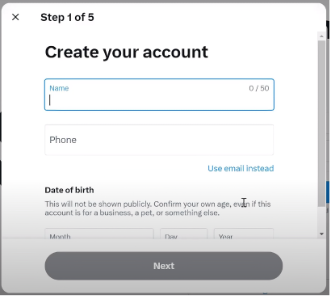
- Verify the Account — Twitter will send a verification code (one-time password) via SMS to that number.
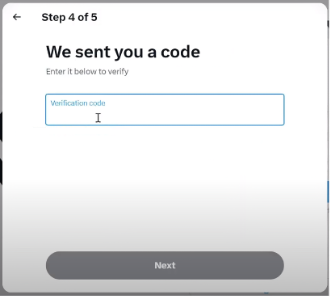
- Enter the Verification Code — Input the code in the designated field on Twitter's sign-up page.
- Complete Registration — Follow the remaining prompts: profile picture, bio, and optionally link an email address for additional account recovery options.
- Start Using Your Twitter Account.
Ready to Get a Temporary Number for Twitter (X) Verification?
⚡ Instant SMS Delivery
Receive verification codes within seconds. Complete your registration immediately without delays.
🌍 Global Number Coverage
Access virtual phone numbers from 180+ countries worldwide. Choose any geographic location that fits your needs.
🔒 Complete Privacy Protection
Keep your real phone number private. Virtual numbers create a secure barrier between your personal contact information and online services.
💰 Competitive Pricing & Discounts
Affordable pricing for all users. Regular customers get access to wholesale prices and loyalty discounts up to 40%.
🔄 Automatic Refund System
No SMS received within 20 minutes? Get an instant automatic refund to your balance.
🕒 24/7 Customer Support
Round-the-clock customer support to assist with any queries or issues.
Other Popular Services
 dolap
dolap trendyol
 getir
getir bip
bip hepsiburada
 sahibinden
 Telegram
 Whatsapp
 Google,youtube,Gmail
 PayPal
 facebook
 Amazon
 TikTok/Douyin
 WeChat
 Discord
 Grindr
 Netflix
 Instagram+Threads
 Viber
Viber vk.com
 OpenAI
 Yahoo
Yahoo LinkedIN
 Microsoft
 Venmo
Venmo Snapchat
 Signal
 Nike
Nike eBay
eBay
More services can be found in the left menu of the site.
FAQ
Yes. HeroSMS virtual numbers fully support Twitter's multi-factor authentication. When Twitter sends a one-time password (OTP) via SMS to verify your identity, the code is delivered instantly to your HeroSMS account — just as it would be to a physical mobile device.
No. A virtual number acts as a buffer between Twitter and your real identity. Your personal phone number, email address, and any other personal data are never shared with the platform. You complete the full SMS authentication process without revealing any private information.
Google Authenticator and password managers protect access to existing accounts. A HeroSMS virtual number is used at the registration stage — it receives the SMS one-time password that Twitter requires to verify a new account. Both approaches improve security, but they serve different steps of the authentication process.
If the confirmation code doesn't arrive within 20 minutes, HeroSMS automatically refunds the cost to your account balance. You can then select a new number and repeat the Twitter verification process at no additional risk.