
Telegram Code SMS via Temp Virtual Number
About Telegram
Telegram has become a favorite messaging app by focusing on security, privacy and seamless integration across multiple accounts and devices:
- End-to-end encryption provides secure private Telegram accounts, locking conversations away like a virtual vault, which is safe from hacking. This prevents unauthorized access to chats.
- Self-destructing messages make it possible to recover sensitive information sent from the same phone number or account. This enables deleting messages that should not permanently remain in the digital ether.
- Chat sync keeps conversations flowing smoothly when switching between multiple accounts on different gadgets with the same number. This allows seamless integration across devices.
- Channels provide the possibility to securely broadcast announcements to key contacts for business purposes. This makes it easy to reach large audiences.
- Generous file sharing capacity lets you easily send large documents internationally without slowdowns, so you can send high-resolution content.
- Intuitive interfaces across mobile and desktop apps make Telegram easy to navigate. This allows quick access to key features.
By providing robust privacy, security, and flexibility between multiple accounts and devices, Telegram has become the go-to choice for seamless communication. The app's meteoric growth shows that it meets the needs of users worldwide who value keeping conversations private and secure.
How to Buy a Virtual Number for Telegram Verification
Securing a virtual number for Telegram verification is a straightforward process, designed to enhance your privacy and security. With online services like HeroSMS, you can buy a fake number for Telegram verification and receive the Telegram code via SMS without exposing your real phone number. Here's a step-by-step guide to help you navigate this process:
- Account Top-Up: Make sure your account on HeroSMS has enough funds. This is a key step to help you immediately purchase the service.
- Enhancing Security with VPN/Proxy: For extra security and a smoother transaction, consider using a VPN or a proxy.
- Selecting Country and Number: At the top of the page choose the country for your virtual number, keeping in mind Telegram's regional requirements. Then, decide how many virtual numbers you need.
- Making the Purchase: Head to the checkout by clicking the cart icon.
- Activating the Virtual Number: After purchasing, your virtual number will appear on the list of purchased numbers.

Copy this number and use it during the Telegram registration process.
- Receiving the Confirmation Code: Enter the virtual number in Telegram. The confirmation code will be sent to this number and should appear next to it on the activation card on HeroSMS
- Code Arrival and Refund Policy: The confirmation code usually arrives quickly. If it doesn't appear within 20 minutes, HeroSMS will refund the amount to your account balance.
Ready to get started?
How to Create a Telegram Account Using a Virtual Phone Number
Setting up a Telegram account with a virtual phone number is a safe way to ensure privacy. Here's a detailed guide of using a number for Telegram:
- Download the App: Begin by downloading the Telegram app on your device.
- Start Creating Your Account: Open Telegram to initiate the account creation process.
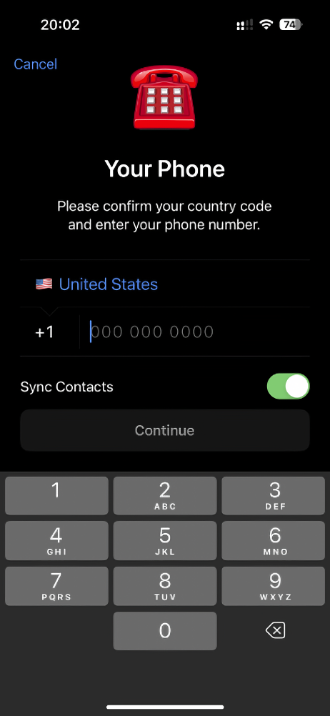
- Enter Your Virtual Number: When prompted, input the virtual number for Telegram that you've obtained.
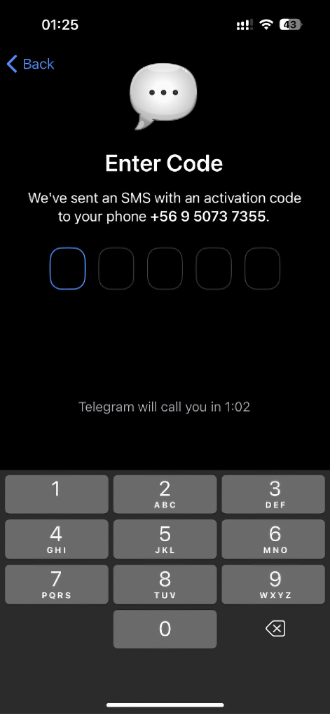
- Receive the Verification Code: Telegram will send a verification code to your virtual number for Telegram.
- Explore Telegram Features: Once your account is successfully created and verified, you can explore the diverse features of Telegram. Customize your profile, add contacts, and start sharing your moments on social media platform.
- Complete Telegram Phone Verification: Enter the received code in the Telegram app to complete the Telegram phone verification process.
- Profile Setup: After the Telegram phone verification process is complete, you can set up your Telegram profile, including your username and, if you wish, a profile picture.
Benefits of Using a Temp Number for Telegram
A virtual phone number for Telegram offers several key advantages:
- Privacy Protection: Using a temporary phone number for Telegram keeps your real number hidden from marketers and strangers.
- Multiple Accounts: A virtual number for Telegram lets you manage several accounts without buying multiple SIM cards.
- No Physical SIM Needed: Get a temp number for Telegram verification without access to traditional mobile services.
- Temporary Solution: A temporary number for Telegram is perfect for one-time verification needs.
- Enhanced Security: Virtual numbers for Telegram protect against fraud, data breaches, and cybercrime by separating your personal information from online accounts.
Improving Your Privacy and Security on Telegram
Maximize security when using virtual numbers for Telegram with these essential features:
- Two-Step Verification: Add a password layer to your Telegram account for enhanced protection beyond SMS verification.
- Secret Chats with Self-Destruct: Enable disappearing messages that automatically delete after a set time, keeping sensitive conversations private.
- Active Session Management: Regularly monitor and terminate suspicious devices connected to your Telegram account.
- Privacy Settings Control: Adjust who can see your phone number, profile photo, and last seen status to maintain anonymity.
- Virtual Number Protection: Using a temporary phone number for Telegram adds an extra privacy layer, separating your real number from your Telegram identity.
- Regular Security Updates: Keep your Telegram app updated to patch vulnerabilities and maintain account security.
Get Your Virtual Phone Number for Telegram from HeroSMS
⚡ Instant SMS Delivery
Receive verification codes within seconds. Complete your registration immediately without delays.
🌍 Global Number Coverage
Access virtual phone numbers from 180+ countries worldwide. Choose any geographic location that fits your needs.
🔒 Complete Privacy Protection
Keep your real phone number private. Virtual numbers create a secure barrier between your personal contact information and online services.
💰 Competitive Pricing & Discounts
Affordable pricing for all users. Regular customers get access to wholesale prices and loyalty discounts up to 40%.
🔄 Automatic Refund System
No SMS received within 20 minutes? Get an instant automatic refund to your balance.
🕒 24/7 Customer Support
Round-the-clock customer support to assist with any queries or issues.
Other Popular Services
 getir
getir trendyol
 Whatsapp
 Google,youtube,Gmail
 PayPal
 facebook
 Amazon
 TikTok/Douyin
 WeChat
 Discord
 Grindr
 Netflix
 Instagram+Threads
 Viber
Viber Twitter
 vk.com
 OpenAI
 Yahoo
Yahoo LinkedIN
 Microsoft
 Venmo
Venmo Snapchat
 Signal
 Nike
Nike eBay
eBay
More services can be found in the left menu of the site.
FAQ
No, Telegram requires a phone number for account creation. However, a virtual or temporary number can be used instead of a personal phone number.
Yes, you can use a virtual phone number to create and verify a Telegram account, ensuring privacy and convenience.
Most virtual phone numbers are suitable for Telegram verification. However, you need to make sure the number is compatible and accepted by Telegram.
Temporary numbers may not offer long-term reliability, and may be inaccessible after a certain period, potentially affecting account recovery.
To register with Telegram using a virtual number, purchase the number, use it for the verification process, and enter the Telegram SMS code you receive.