


Temporary Phone Number for ChatGPT
About ChatGPT
ChatGPT and OpenAI have rapidly gained immense popularity worldwide, but registering requires handing over your personal mobile number for identity confirmation. This puts many cautious users in a difficult position: sacrifice private data, or lose access to one of the most powerful AI chatbots on the internet. Thankfully, virtual phone numbers present the ideal remedy. Temporary numbers tailored for ChatGPT verification supply the one-time SMS passcode needed to configure your profile, while preserving your anonymity. This guide examines the benefits of using a virtual number for ChatGPT and details how to swiftly obtain one via HeroSMS without jeopardizing your personal data — whether you find ChatGPT through a search engine, access it via a mobile app, or use it daily as part of a remote work routine.
Why Use a Virtual Number for ChatGPT?
One major advantage of using a virtual phone number service is the ability to receive SMS verification codes for ChatGPT registration from any location — no physical SIM card required. This makes it convenient to create or verify accounts while traveling or living abroad, or in countries where ChatGPT access is restricted.
Virtual numbers also suit those seeking extra privacy: the disposable, temporary number cannot be traced back to your real identity, keeping your personal information separate from your ChatGPT activities. Unlike a physical SIM card, a virtual number works entirely over the internet — no hardware required. Your real number is never exposed, and nothing links the temporary number back to you.
How to Get a Virtual Number for ChatGPT
Step 1: Fund Your Account
Add funds to your balance on HeroSMS. This step is necessary for purchasing a virtual phone number.
Step 2: Ensure Anonymity
Use a Virtual Private Network (VPN) or proxy server to mask your IP address and prevent tracking during registration. For extra anonymity, open ChatGPT in a private browsing window — Google Chrome's Incognito mode works well for this.
Step 3: Select an OpenAI Virtual Phone Number
On HeroSMS, select the country from which you want a virtual number. Click the cart icon to purchase, specifying it is for SMS verification.

Step 4: Enter the Virtual Number During ChatGPT Verification
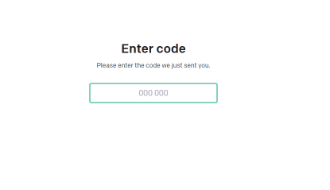
When ChatGPT prompts for a telephone number, enter the temporary number you acquired. A 6-digit confirmation code will appear in your HeroSMS dashboard.
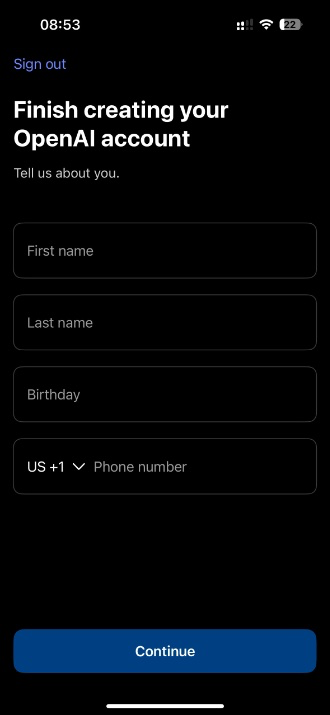
Step 5: Complete the Verification Process
Enter the confirmation code into ChatGPT to finalize verification. Your account is now active — no real phone number or identity disclosed.
Ready to get started?
How to Use a Temporary Phone Number to Create a ChatGPT Account
Step 1: Conceal Your Location with Proxy/VPN
- Enable a VPN or proxy server on your device.
- Set your virtual location to match the country of the temporary number.
- Confirm that websites register your location as the number's country.
Step 2: Register Your ChatGPT Account
- Open ChatGPT and enter your temporary number during signup.
- Copy the confirmation code from your HeroSMS dashboard and submit it to the verification form.
- Registration completes successfully.
Important Privacy Tips:
- Use incognito/private browsing mode for added anonymity.
- Clear cookies and browser history if you previously attempted to create an account.
- Do not register multiple accounts from one IP address — this is prohibited by OpenAI.
Security Concerns: Giving OpenAI Your Phone Number
While OpenAI requests phone numbers for authentication and account security, providing your personal number carries risks. Any future data breach could expose your number alongside your usage history. Phone numbers linked to an identity can also be targeted in SIM swap scam attacks or used to facilitate identity theft. Even with OpenAI's commitment not to sell your data, users are right to be cautious.
Benefits of Using a Temporary Number for ChatGPT
- Enhanced Privacy — prevents OpenAI from linking your conversations to your real identity.
- Access Restricted Locations — a virtual number from an allowed country helps bypass regional ChatGPT bans.
- Manage Multiple Accounts — each account gets its own unique virtual number, enabling clean compartmentalization.
- Backup Account Access — if your primary account is disabled, a secondary disposable number provides a fallback.
- User Anonymity — the temporary number cannot be traced back to reveal your real identity.
- Number Disposability — discard the number once used, with no impact on your real SIM card.
- Improved Security — keeping your personal mobile number private reduces SIM swap scam and identity theft risk.
- No Long-Term Commitments — short-term access with no contracts or recurring cell phone plan obligations.
- Budget-Friendly — far cheaper than international telephone plans; top up only what you need.
- Quick & Easy Access — getting a throwaway number takes minutes, works via mobile app or browser, and requires no hardware.
- Works From Anywhere — whether on a mobile app or desktop browser, HeroSMS works over any internet connection worldwide, including for remote work setups where a local telephone number is impractical.
Why Use HeroSMS for ChatGPT Verification?
⚡ Instant SMS Delivery
Receive verification codes within seconds. Complete your registration immediately without delays.
🌍 Global Number Coverage
Access virtual phone numbers from 180+ countries worldwide. Choose any geographic location that fits your needs.
🔒 Complete Privacy Protection
Keep your real phone number private. Virtual numbers create a secure barrier between your personal contact information and online services.
💰 Competitive Pricing & Discounts
Affordable pricing for all users. Regular customers get access to wholesale prices and loyalty discounts up to 40%.
🔄 Automatic Refund System
No SMS received within 20 minutes? Get an instant automatic refund to your balance.
🕒 24/7 Customer Support
Round-the-clock customer support to assist with any queries or issues.
Other Popular Services
 sahibinden
 lazada
 grab
grab garena
 zalo
zalo shopee
 trendyol
 getir
getir bip
bip hepsiburada
 Tiki
Tiki dolap
dolap ciceksepeti
 yemeksepeti
- Trendyol Go
 papara
 ininal
 paycell
 btcturk
 Mobile Legends
 ChoTot
 Telegram
 Whatsapp
 Google,youtube,Gmail
 PayPal
 facebook
 Amazon
 TikTok/Douyin
 WeChat
 Discord
 Grindr
 Netflix
 Instagram+Threads
 Viber
Viber Twitter
 vk.com
 Yahoo
Yahoo LinkedIN
 Microsoft
 Venmo
Venmo Snapchat
 Signal
 Nike
Nike eBay
eBay
More services can be found in the left menu of the site.
FAQ
Yes. A virtual number issued from a country where ChatGPT is available lets you complete SMS verification and create an account regardless of your physical location. Pair it with a VPN or proxy server to mask your IP address, and registration proceeds as normal.
Yes, and it is often safer than providing your real telephone number. A temporary number keeps your personal identity separate from your ChatGPT account, eliminating the risk of identity theft or a SIM swap scam in the event of a data breach. Once the verification code is used, the number can be discarded entirely.
Virtual numbers from HeroSMS are intended for one-time verification at registration. For future account recovery, OpenAI offers email-based alternatives — make sure to save your login credentials and keep your email address accessible.
OpenAI does block some VoIP phone numbers during verification. HeroSMS provides numbers specifically selected to pass ChatGPT's verification checks. If a particular number is rejected, simply release it and select a new one from a different country — the process takes under a minute.