


LinkedIn Phone Number Verification — Get a Virtual Number
About LinkedIn
LinkedIn enforces phone verification during account creation to confirm each profile belongs to a real person. The platform is built around professional identity — job titles, career histories, business relationships — and a unique number per account makes it significantly harder to create fake profiles at scale.
The tradeoff is privacy. LinkedIn can use your number for targeted advertising, match it against contact lists uploaded by other users, and expose it in data breaches. A virtual phone number satisfies the verification requirement without putting your real contact details into LinkedIn's database.
How to Buy a Virtual Number for LinkedIn Verification
Getting a temporary phone number for LinkedIn verification on HeroSMS takes under two minutes. Follow these steps:
- Register on HeroSMS and top up your balance using cryptocurrency. For additional privacy during transactions, consider enabling a VPN or proxy.
- Navigate to the LinkedIn service page or use the selector at the top of this page — the service field is pre-filled.
- Select your preferred country. If you need a number from a specific geographic location (useful for region-restricted account setups), browse the full country list.
- Click the cart icon to purchase your virtual phone number for LinkedIn. The number appears instantly in your account under "My Purchases."
- Copy the number and paste it into LinkedIn's phone verification field during sign-up or account security confirmation.
- Return to your HeroSMS account and wait for the SMS code to appear on the activation card, typically within seconds. Enter the code on LinkedIn to complete verification.
If the LinkedIn verification code does not arrive within 20 minutes, the amount is automatically refunded to your balance — no manual requests required.
How to Create a LinkedIn Account Using a Virtual Phone Number
- Go to linkedin.com or open the LinkedIn mobile app and click "Join now" to start the registration process.
- Enter your first name, last name, and a working email address. These details will be tied to the account.
- When prompted for a phone number, enter the temporary LinkedIn number you purchased from HeroSMS. This number will receive the SMS verification code.
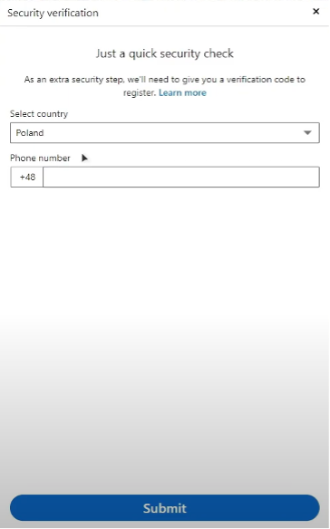
- LinkedIn sends a 6-digit one-time password (OTP) to the number you provided. Open your HeroSMS activation card to retrieve the code — it appears next to your virtual number.
- Enter the OTP into LinkedIn's verification field to confirm the phone number and proceed with account setup.
- Set your password, add your professional details (job title, industry, location), and complete any remaining steps.
- LinkedIn may send a confirmation email as a final step. Follow the link to fully activate your new account.
This process works identically for personal profiles, business pages, and LinkedIn Premium trial registrations.
Ready to get started?
Benefits of Using a Temp Number for LinkedIn
- Privacy for professional identity — LinkedIn is permanently linked to your real name and career. Using a disposable number during registration keeps your personal phone number out of the platform's database, reducing the risk of it being exposed through data breaches or third-party data sharing.
- Multiple account management — Recruiters, market researchers, and social media managers who need to operate separate LinkedIn profiles can use a unique virtual number for each account. LinkedIn requires a distinct phone number per account, and HeroSMS supplies numbers from 180+ countries daily.
- Geographic flexibility — Numbers from specific countries allow users to register accounts that appear locally based, which can be useful for region-targeted outreach, local job market research, or accessing country-specific LinkedIn features.
- No SIM card required — A virtual number works entirely over the internet. There is no need to purchase a physical SIM card, activate a new mobile plan, or own a second device.
- Cost efficiency — Temporary numbers for one-time verification are significantly cheaper than maintaining additional phone lines. The 20-minute activation window means you only pay for what you use.
- Instant access — Numbers are available immediately after purchase. There is no waiting period, approval process, or identity check required on the HeroSMS side.
Improving Your Privacy and Security on LinkedIn
- Use a virtual number as your primary verification contact — This disconnects your real phone number from LinkedIn's database entirely, preventing it from being matched to your profile by other users or third-party tools.
- Avoid linking your personal email and phone simultaneously — Using a dedicated or temporary email alongside a virtual phone number limits the personal data tied to the account, reducing your footprint on the platform.
- Combine virtual numbers with a VPN — A VPN masks your IP address during registration and use, complementing the anonymity provided by a disposable phone number. Together, they prevent location-based profiling.
- Review LinkedIn's data-sharing settings — LinkedIn offers granular privacy controls under Settings & Privacy. After creating an account, disable data sharing with third-party partners and restrict who can see your connections and activity.
- Use separate LinkedIn accounts for different purposes — If you manage professional and research or promotional activity on LinkedIn, keep them on separate accounts with separate virtual numbers to prevent cross-contamination of your professional reputation.
- Be aware of LinkedIn's identity verification features — LinkedIn has introduced optional ID verification and video confirmation for profiles. These are opt-in for trust signals, not mandatory for account creation, and do not affect the SMS verification step covered by HeroSMS.
Get Your Virtual Phone Number for LinkedIn from HeroSMS
⚡ Instant SMS Delivery
Receive verification codes within seconds. Complete your registration immediately without delays.
🌍 Global Number Coverage
Access virtual phone numbers from 180+ countries worldwide. Choose any geographic location that fits your needs.
🔒 Complete Privacy Protection
Keep your real phone number private. Virtual numbers create a secure barrier between your personal contact information and online services.
💰 Competitive Pricing & Discounts
Affordable pricing for all users. Regular customers get access to wholesale prices and loyalty discounts up to 40%.
🔄 Automatic Refund System
No SMS received within 20 minutes? Get an instant automatic refund to your balance.
🕒 24/7 Customer Support
Round-the-clock customer support to assist with any queries or issues.
Other Popular Services
 sahibinden
 lazada
 grab
grab garena
 zalo
zalo shopee
 trendyol
 getir
getir bip
bip hepsiburada
 Tiki
Tiki dolap
dolap ciceksepeti
 yemeksepeti
- Trendyol Go
 papara
 ininal
 paycell
 btcturk
 Mobile Legends
 ChoTot
 Telegram
 Whatsapp
 Google,youtube,Gmail
 PayPal
 facebook
 Amazon
 TikTok/Douyin
 WeChat
 Discord
 Grindr
 Netflix
 Instagram+Threads
 Viber
Viber Twitter
 vk.com
 OpenAI
 Yahoo
Yahoo Microsoft
 Venmo
Venmo Snapchat
 Signal
 Nike
Nike eBay
eBay
More services can be found in the left menu of the site.
FAQ
LinkedIn uses phone verification to confirm that new accounts are created by real individuals. This helps the platform reduce fake profiles, limit spam, and maintain a trustworthy environment for professional networking and recruitment.
Yes. A virtual phone number receives SMS messages the same way a physical SIM does. LinkedIn sends a verification code to the number you provide during registration, and that code arrives in your HeroSMS account for you to enter. The process is identical to using a regular mobile number.
HeroSMS provides virtual numbers for LinkedIn from 180+ countries, with instant SMS delivery and an automatic refund if no code arrives within 20 minutes. The platform is built on the technical infrastructure of SMS-Activate, the former market leader, and offers competitive pricing with a loyalty discount program.
No. LinkedIn requires a unique phone number for each account. To register multiple profiles, you will need a separate virtual number for each one. HeroSMS supplies 500,000+ numbers daily, so bulk registrations are fully supported.
If the verification code does not appear within 20 minutes, the cost of the number is automatically refunded to your HeroSMS balance. You can then purchase a new number and try again with a different one.
Yes. You can select from numbers across 180+ countries at the top of this page. This is useful if you need a number from a particular region for location-specific account setup or geo-targeted research on the platform.