

Phone Number for Google Verification via Virtual Number
About Google
Google and Gmail require phone number verification for account security and two-factor authentication (2FA). This also applies to YouTube and other Google services. A virtual number for Google verification provides a secure alternative, letting you verify your Google account without exposing your personal mobile number—accessible on any device with an internet connection, from smartphones to desktop computers.
How to Buy a Temporary Phone Number for Gmail
To purchase a temporary phone number for Gmail verification, follow these simple steps:
- Prepare Your Account: Ensure your balance is topped up for the purchase.
- Country Selection: Decide on the country from which you want the virtual number from the list at the top of this page.
- Purchase Process: Click on the shopping cart icon to finalize the purchase of your chosen virtual number. This Gmail verification phone number will then be used as a fake number for Google verification to protect your privacy.
- Registration with Gmail: Once you have the number, use it to register on Gmail. Enter this number in the required field during the account creation process.
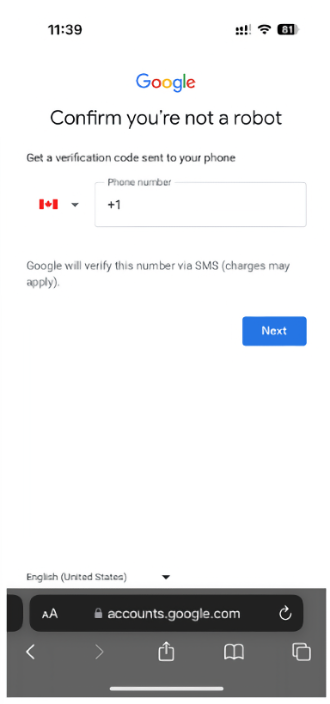
- Receiving the Verification Code: After entering the number on Gmail, you will receive SMS online with the Google verification code to the temporary number.
- Completing Verification: Enter the received confirmation code to complete your account verification. Your number for Google verification will now be linked to your Gmail account.
Ready to get started?
Creating a Google Account with a Virtual Number
Creating a Google account with a virtual phone number involves a more comprehensive process:
- Start at Google's Sign-Up Page: Navigate to Google's account creation page using any web browser or the Gmail mobile app on Android or iOS devices. This is where you'll begin the process of setting up a new account.
- Enter Basic Information: Provide your first and last name. Then, choose a username for your new Gmail address and create a secure password.
- Use the Virtual Number for Verification: When prompted for a phone number, enter the virtual number you purchased. This number for Google account verification will allow you to receive the SMS verification codes online without exposing your real mobile number.
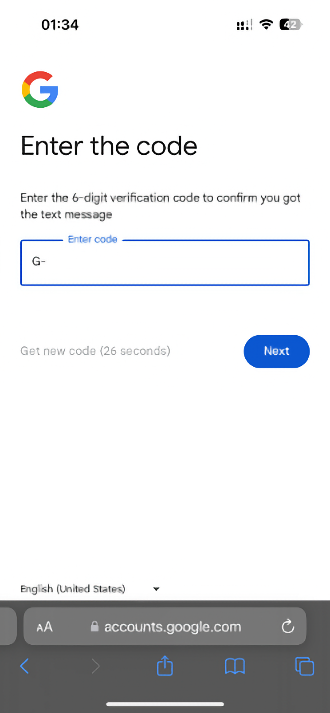
- Await the Verification Code: Google will send a verification code to the virtual number. This code is necessary to confirm that the phone number is valid and accessible by you.
- Retrieve and Enter the Code: Check the platform where you got your virtual number to find the verification code. Enter this code into the Google account setup page to complete the verification step.
- Complete Additional Information: Google may request additional information, such as a recovery email address. This is not mandatory, but can be helpful for account recovery purposes.
- Agree to Google's Terms of Service: Review and agree to the terms of service and privacy policy to proceed.
- Finalize Account Creation: Complete the setup by following any additional on-screen instructions. Once done, your Google account will be active and ready to use.
- Account Personalization: You can now personalize your Google account by adding a profile picture, adjusting settings, and exploring various Google services.
- Maintaining Account Security: Remember to regularly check and update your account's security settings.
Benefits of Using a Temporary Number for Gmail
A virtual phone number for Gmail verification offers several practical advantages:
Privacy Protection: Using a number for Google verification keeps your personal mobile number private, avoiding unwanted contact from spammers and marketers while maintaining anonymity by separating your identity from your IP address and online activity.
Multiple Account Management: Create and manage multiple Google accounts for work, personal use, or projects without needing multiple SIM cards.
Enhanced Security: Protect against identity theft, data breaches, and security threats by separating your real number from online accounts.
No Physical SIM Required: Get a number for Google verification without access to traditional mobile services or physical SIM cards—only an internet connection needed on any device.
Temporary Solution: Perfect for one-time verification or short-term projects without long-term commitment.
Reduce Digital Footprint: Minimize your online presence and avoid linking your primary phone number across multiple services and platforms.
Get Your Virtual Phone Number for Gmail From HeroSMS
⚡ Instant SMS Delivery
Receive verification codes within seconds. Complete your registration immediately without delays.
🌍 Global Number Coverage
Access virtual phone numbers from 180+ countries worldwide. Choose any geographic location that fits your needs.
🔒 Complete Privacy Protection
Keep your real phone number private. Virtual numbers create a secure barrier between your personal contact information and online services.
💰 Competitive Pricing & Discounts
Affordable pricing for all users. Regular customers get access to wholesale prices and loyalty discounts up to 40%.
🔄 Automatic Refund System
No SMS received within 20 minutes? Get an instant automatic refund to your balance.
🕒 24/7 Customer Support
Round-the-clock customer support to assist with any queries or issues.
Other Popular Services
 getir
getir trendyol
 Telegram
 Whatsapp
 PayPal
 facebook
 Amazon
 TikTok/Douyin
 WeChat
 Discord
 Grindr
 Netflix
 Instagram+Threads
 Viber
Viber Twitter
 vk.com
 OpenAI
 Yahoo
Yahoo LinkedIN
 Microsoft
 Venmo
Venmo Snapchat
 Signal
 Nike
Nike eBay
eBay
More services can be found in the left menu of the site.
FAQ
Yes, Gmail allows the use of virtual phone numbers for account verification and setup.
You can purchase a temporary number from services like HeroSMS and use it for Google account verification.
Yes, Google allows a mobile phone number to be linked to multiple Gmail accounts for verification purposes.
Google requires phone number verification for account creation. However, you can use a virtual phone number from HeroSMS instead of your personal mobile number to complete the verification process.
Temporary numbers may not be suitable for long-term account recovery options; plus, they might expire, potentially causing issues with account access in the future.
Google uses security algorithms to detect suspicious activity and prevent spam. Phone verification may be required when creating multiple accounts from the same device or IP address, or when Google's algorithms flag unusual behavior. Using a virtual number helps you complete verification while maintaining privacy.